
Design tokens are the most talked-about and most misunderstood layer of a design system. This is the plain-English version: what a token is, the three tiers, how to name them, the standard that just stabilized, and the step most teams skip, getting tokens from a file into production consistently. If you are starting from zero, tokens are the first layer to lay down when you build a design system.
What a design token is
A design token is a named entity that stores a single design decision, a color, a spacing value, a font size, a motion curve, in a platform-agnostic format. Instead of writing #0057FF in fifty places, you define color.brand.primary once and reference the name everywhere. Change the value in one place and every surface updates. Tokens are shared by design tools like Figma and by code across web, iOS, and Android, which is what lets a single decision reach every platform.
The three tiers
Modern token systems use three tiers, the same structure with different jobs:
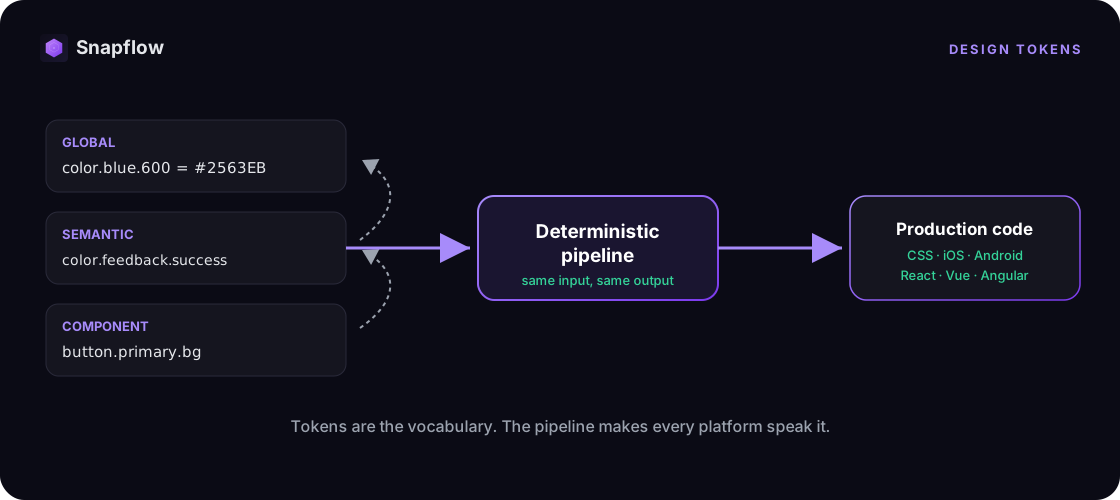
- Global (primitive) tokens. The raw palette: color.blue.500, space.4, font.size.16. Your vocabulary, with no meaning attached yet.
- Semantic (alias) tokens. Intent mapped onto raw values: color.background.surface, color.feedback.success, space.inset.md. When the brand changes, you update the mapping, not every component.
- Component tokens. The most specific: button.primary.background, card.radius. They point up the chain to semantic and global tokens.
The rule that keeps this clean: components reference semantic tokens, semantic tokens reference global tokens. Values live in one place, and everything else is a reference.
Name by intent, not appearance
The single most useful naming rule: name a token for what it means, not how it looks. Use color.feedback.success, not color.green. Use color.background.surface, not gray-100. Appearance names break the moment the brand shifts, intent names survive it. Keep a consistent category.property.variant structure, and keep it clear enough that your team applies it without hesitating. Token names do not need to be academically perfect, they need to be unambiguous.
The standard: design tokens got boring, on purpose
Until recently every tool spoke its own token dialect. That changed in October 2025, when the W3C Design Tokens Community Group shipped the first stable version of the Design Tokens format, a single JSON shape built around $value and $type. It was authored by editors from Adobe, Google, Microsoft, Meta, Figma, Salesforce, Shopify, Tokens Studio, Supernova, and zeroheight, among others, and it is supported by Figma, Penpot, Sketch, Tokens Studio, and Style Dictionary. Tokens are now portable between tools instead of locked to one. That is real progress, and it is also where most guides stop.
From a file to production: the pipeline
A standard file format makes tokens portable. It does not deliver them. Two tools do the heavy lifting. Tokens Studio defines, manages, and syncs tokens inside Figma, with aliasing, theming, and multi-brand support. Style Dictionary, the open-source tool from Amazon, transforms one token source into platform-ready code: CSS, iOS, Android, and more. Together they turn a token file into variables your codebase can actually use. This is the design-to-code pipeline, and it is the first piece of infrastructure every design system needs.
Where tokens stop and infrastructure begins
Here is the step most teams skip. A token file, even a standards-compliant one, is inert. It describes decisions, it does not enforce them, deliver them across every framework, or keep design and code from drifting. Getting there takes more than a format:
- a deterministic pipeline that produces the same output every run,
- governance that catches token misuse before it ships,
- and an AI context layer so that Cursor, Copilot, and Claude Code generate code that uses your tokens instead of inventing values.
That layer is design system infrastructure. Tokens are the vocabulary. Infrastructure is what makes your whole organization, and now your AI agents, actually speak it, consistently, in production. Snapflow hands you that layer already built: an agentic design system with tokens, components, and governance rules in React, Vue, and Angular, customized with your brand. Your agent (Claude Code, Cursor, or Codex) builds from it with the /snapflow skill and the MCP. For the bigger picture of the software around tokens, we mapped it in design system tools.
FAQ
What are design tokens, in simple terms?
Named values that store one design decision each, like color.brand.primary instead of a hex code, in a format both design tools and code can read. Change the value once and every screen that references it updates.
What is the difference between design tokens and variables?
Figma Variables are one way to author tokens inside Figma. Design tokens are the broader, platform-agnostic concept: the named decisions that travel from Figma to every platform. Variables are a source, tokens are the shared language across tools and code.
Is there a design tokens standard?
Yes. In October 2025 the W3C Design Tokens Community Group released the first stable version of the Design Tokens format, a JSON structure using $value and $type, now supported by Figma, Tokens Studio, Style Dictionary, and more.
Do I need Style Dictionary or Tokens Studio?
They solve different halves. Tokens Studio manages tokens inside Figma, Style Dictionary transforms them into platform code. Together they move tokens from design into a codebase. Neither, on its own, gives you governance or agentic delivery across every framework, which is where infrastructure comes in.
What is an example of a design token?
color.feedback.success mapped to color.green.600 mapped to #16A34A. The component references the semantic name, the semantic name references the global value, and the raw hex lives in exactly one place.
See it on your own tokens
The fastest way to see where tokens help and where they stall is on your own system. Snapflow is waitlist-only for now, and we open seats in batches, in order. Join the waitlist or see pricing.