
zeroheight is a hosted platform for documenting and managing a design system: connect Figma, embed live components, write usage guidelines, sync tokens and Storybook from your repo, and give designers, developers, and product managers one place to agree on what the system is. It does that job very well. If you searched for a "zeroheight alternative," this guide gives you the honest set of options, and one reframe worth pausing on before you pick.
The real like-for-like alternatives
If what you want is another documentation platform, three are worth a look:
- Supernova. Documentation plus a stronger token-management and code-handoff layer. The closest option feature-for-feature to zeroheight; we break it down in Supernova vs zeroheight.
- Storybook. Open source and code-first. If your design system is primarily a component library that already lives in the codebase, Storybook documents it where it runs. Free.
- Knapsack. Documentation aimed at connecting design and engineering artifacts in one workspace, positioned for larger organizations.
All three do roughly what zeroheight does: they make the system visible, governed, and adopted. If your problem is "our design system is not documented or discoverable," any of them, including zeroheight, solves it.
The reframe: documentation is not the same job as infrastructure
Here is the question worth asking before you compare docs tools feature by feature: is documentation actually your gap?
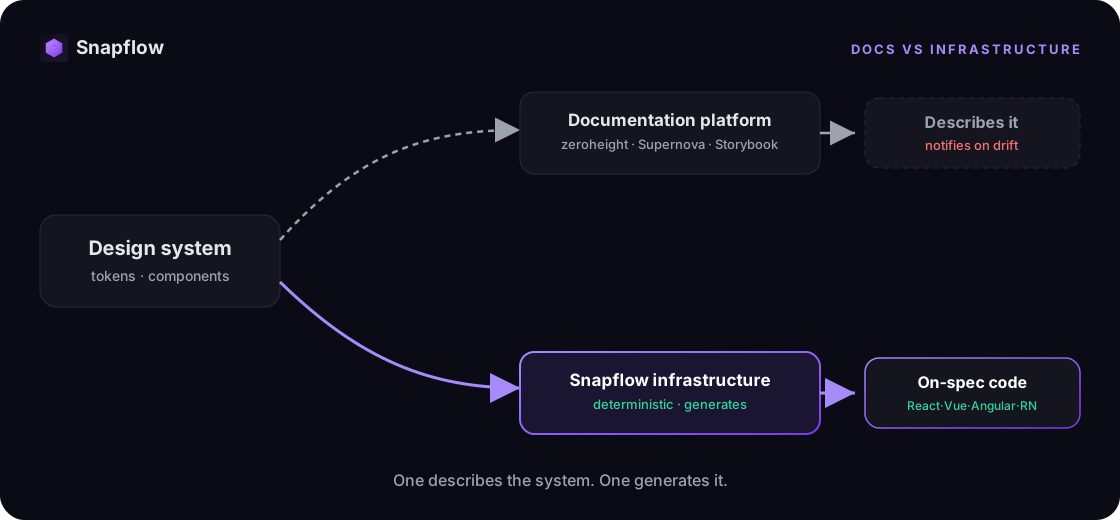
zeroheight and its peers describe the system, and in 2026 they do it impressively: live Figma embeds, token drift notifications when Figma and GitHub disagree, machine-readable docs for AI agents. But notice what that drift notification admits. A tool that tells you your tokens have diverged from your code is confirming the drift already happened. Documentation is the mirror. It shows you the gap. It does not close it.
The gap gets closed upstream, where the code is generated. Design system infrastructure reads your tokens and component contracts and generates the production code itself, across React, Vue, and Angular. The design and the code stay in sync because both come from one deterministic source, not two copies that a docs tool has to police.
Documentation platform vs. infrastructure
| Documentation platform (zeroheight, Supernova, Storybook) | Design system infrastructure (Snapflow) | |
|---|---|---|
| Primary job | Describe and publish the system | Generate the code from the system |
| Source of truth | A synced record humans read | A deterministic system tools and agents read |
| On drift | Notifies you it happened | Prevents it: code comes from the source |
| Code | Embeds and syncs snippets | Produces on-spec components |
| AI agents | Machine-readable docs to read | Infrastructure agents can call to generate |
| Best when | The system needs adoption and governance | The system needs to ship as code, consistently |
Documentation and infrastructure are not rivals. You can document with zeroheight and generate with infrastructure. But if you are shopping for an alternative because the docs are not stopping the rework, another docs tool will not stop it either.
How to tell which one you actually need
Run your pain through this:
- Is the complaint "nobody can find or follow our system," or "the code never matches the system"?
- Do designers and developers need a shared reference, or does the handoff itself keep breaking?
- When Figma and code disagree, do you want to be told, or do you want them to come from the same source so they cannot disagree?
- Are your AI agents reading docs, or do you need them calling infrastructure that generates on-spec code?
Answers on the left mean you want documentation, and zeroheight is an excellent pick. Answers on the right mean the gap is not docs. It is infrastructure.
Where Snapflow fits
Snapflow is not a documentation alternative to zeroheight. It is the foundation underneath: an agentic design system already built, with tokens, components, and governance rules in React, Vue, and Angular, customized with your brand. Your agent writes the code from it with the /snapflow skill and the MCP, and the result passes your lint and your types. See how it works. Keep zeroheight for documentation if you love it; it will finally be documenting a system that does not drift.
FAQ
What is the best zeroheight alternative?
For documentation, Supernova is the closest feature-for-feature, Storybook is the code-first open-source option, and Knapsack targets larger organizations. If your real gap is code that drifts from the system, the alternative is not another docs tool but design system infrastructure.
Is zeroheight worth it?
Yes, for what it does. zeroheight is one of the highest-rated documentation platforms and is strong at adoption, governance, and cross-functional collaboration. The real question is whether documentation is the job you need done, or whether your pain lives in the design-to-code handoff.
What is the difference between design system documentation and infrastructure?
Documentation describes the system and keeps a synced record for people, and increasingly agents, to read. Infrastructure generates the production code from the system so design and code stay in sync by construction. Docs show drift; infrastructure prevents it.
Can I use zeroheight and Snapflow together?
Yes. They do different jobs. zeroheight documents and publishes the system; Snapflow generates the code from it. Used together, the documentation describes a system the infrastructure keeps consistent in production.
See it on your own system
The fastest way to see the difference is on your own design system. Snapflow is waitlist-only for now, and we open seats in batches, in order. Join the waitlist or see pricing.