
Your agent already writes interfaces. Claude Code, Cursor or Codex put together a sign-up screen in seconds and the result looks fine. The problem shows up on the third try: the button came out in a different blue, the spacing does not match the previous screen, and the form your teammate built uses another component for the same thing. The agent is not bad. It just has nothing reliable to read.
The agent already writes interfaces. The problem is what it reads
A coding agent works with the context at hand: the prompt, the open files and what it remembers from training. When you ask for a component, it invents the one that best fits that context. If your team has a design system in Figma and a library in the repo, the agent sees them as two more things among many, and rarely treats them as the authority.
The result is code that is almost right, which is the most expensive kind of wrong: somebody has to reconcile it with the real system, by hand, later. The fix is not a longer prompt. It is giving the agent a system it can read precisely.
What is an agentic design system
An agentic design system meets four conditions that a component library, however good, does not meet on its own:
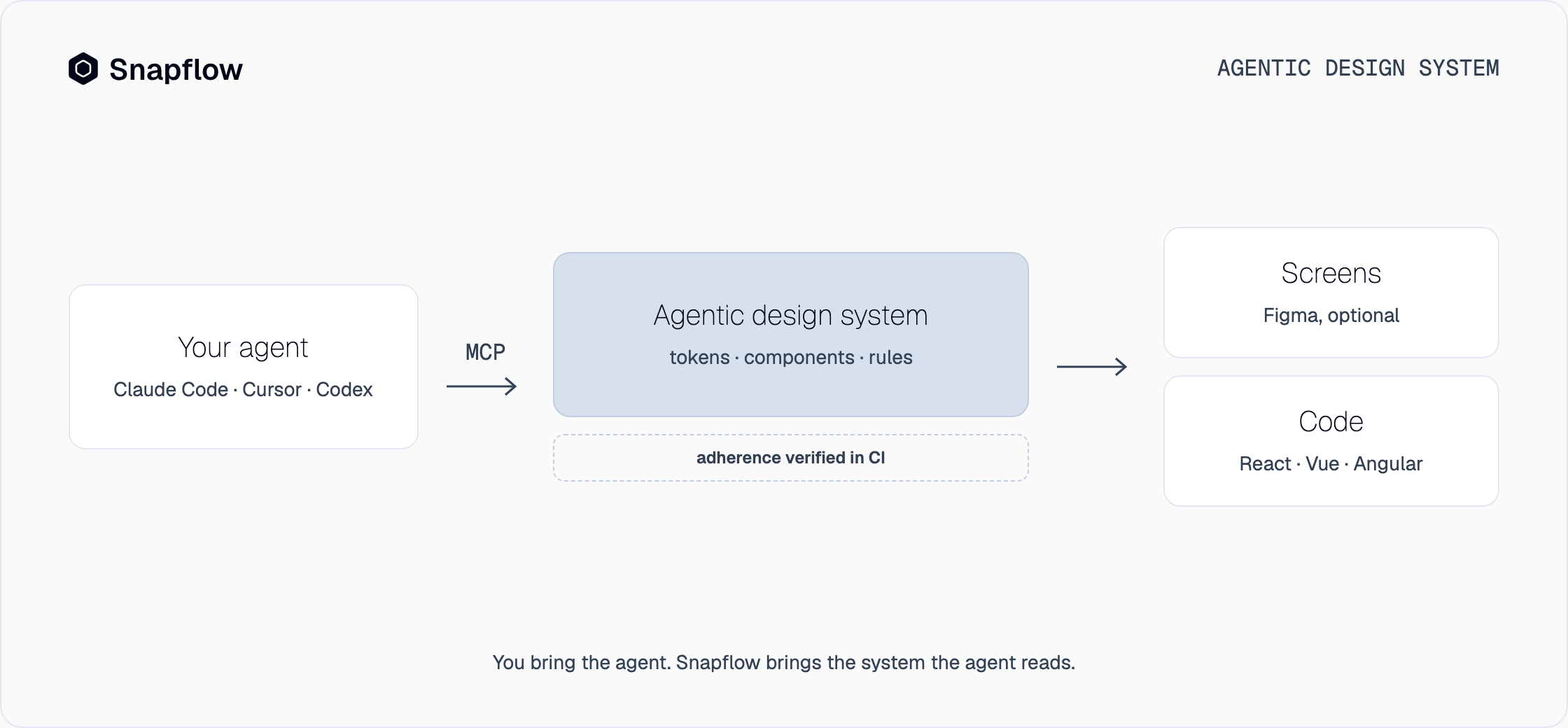
- A machine can read it. Tokens, components, variants and rules are exposed through a protocol the agent understands. In Snapflow that protocol is MCP, the same one Claude Code, Cursor and Codex already use to connect to tools.
- It is deterministic. Different prompts with the same intent produce the same screen and the same code. The primary action button is always the same component with the same tokens, whoever asks for it.
- It is governed. The rules do not live in a document: they run. A loose value that does not come from the tokens is a finding in CI, and the pull request does not pass.
- It ships to your stack. One definition, three outputs: React, Vue 3 and Angular. The agent writes in your repo's framework and the component is the same in all three.
What sets it apart from design system infrastructure is not the base, which is the same (tokens, pipeline, component architecture and governance), but who the surface is built for: infrastructure gave your team a pipeline; an agentic design system also gives your agent an interface.
From the library to the agentic system
It helps to see the four steps a team goes through, because each one solves a problem and brings the next into view.
| Who reads it | What it guarantees | What happens when a token changes | |
|---|---|---|---|
| Component library | The developers who know it | That a button exists | Somebody changes it by hand in every place |
| Documentation | People, on a separate site | That it is described | The page is updated and people are notified |
| Infrastructure | Your team's pipeline | That it reaches production the same | It propagates to every platform on the next build |
| Agentic design system | Your AI agent, over MCP | That new work comes out consistent too | The agent generates with the new value from the next prompt |
We covered the first three steps in depth in how to build a design system and in design tokens. The fourth is the one agents change: for the first time, the system's main consumer is not a person.
How your agent works with one
In Snapflow the flow is short and stays inside your repo:
- One command connects the design system. The installer leaves the MCP and the Snapflow skill in your project; your agent loads them when it opens it, like any other tool.
- Your brand goes in once. From a URL or a brand manual, the design system is personalized in seven steps: colors, typography, radii, logo. From there, everything it generates carries your brand.
- You ask for screens, not components. With Composition you describe the screen, or hand it a screenshot, and the agent builds it with the system's components, respecting your repo's lint and types.
- It exports to your repo's framework. The same design comes out in React, Vue 3 or Angular. If your team designs in Figma, the plugin mirrors the same components there; if not, Figma is optional.
- Verification closes the loop. The adherence check runs in CI with no model involved: what leaves the system does not get in.
Your agent, with and without an agentic design system
The agent is the same. What changes is what it can read.
| Your agent alone | Your agent with Snapflow | |
|---|---|---|
| Context | The prompt and what it remembers | The design system, over MCP |
| Consistency | Every run invents a little | The same intent gives the same result |
| Scope | A fragment of code | Complete screens, in design and code |
| Governance | Manual review | Adherence verified in CI |
| Brand | Whatever the agent guesses | Yours, applied once to the system |
What is yours and what the plan pays for
Every screen you choose stays in your Figma file and every export stays in your repo, with no license on your files: if you leave, they stay with you. What the plan pays for is the engine that composes screens from the design system and keeps it consistent. Access is waitlist-only for now, and pricing is per seat and per design system, with fifteen days free; it is published on the pricing page.
Frequently asked questions
Is Snapflow an AI agent?
No. Snapflow is the design system your agent calls. You keep using Claude Code, Cursor or Codex; what changes is that they now read a deterministic system instead of guessing.
Do I need a design system to use it?
No. Snapflow delivers one already built, with tokens, components and governance rules, and you personalize it with your brand in seven steps. If you already have design decisions, they come in as brand; there is no library to migrate.
Which frameworks does it cover?
React, Vue 3 and Angular, from the same definition. Each design system comes with one framework of your choice, and the others are added as an add-on.
Is Figma required?
No. The agent works in your code with the MCP and the skill. The Figma plugin mirrors the same components for teams that design there, but it is optional.
How is this different from design system infrastructure?
The base is the same: tokens, pipeline, components and governance. An agentic design system adds the surface your agent reads and the verification of what it generates. Without that layer, infrastructure serves your team but not its AI.
Try it with your agent
The shortest way to understand an agentic design system is to ask your agent for a screen and see it come out with your brand and your components. Snapflow is waitlist-only for now, and we open seats in batches, in order. Join the waitlist or see pricing.