
The scene repeats in every team: the designer finishes the screen in Figma, hands it to development and, two days later, what is in the browser looks similar. The button is a different blue, the spacing grew by four pixels and the form field is a new component nobody asked for. Nobody did anything wrong. The problem is the step in the middle.
What figma to code is
Figma to code is the step where a screen designed in Figma becomes front-end code: React, Vue or Angular components that can be integrated and shipped. Today that step happens in one of three ways:
- By hand. A developer inspects the frame (Figma's development mode shows sizes, colors and type) and writes the component. It is the most common method and the slowest.
- With a plugin or exporter. A tool reads the frame and exports markup and styles. It is fine for getting a screen started; what comes out is the translation of a drawing, not a component wired to the rest of the code.
- With AI. A coding assistant gets a screenshot, a description or the link to the frame and writes the component. It is fast and increasingly common, and the quality depends entirely on what the assistant can read besides the image.
All three start from the same assumption: the design is the source and the code is a translation. And every translation loses something.
Why the code never matches the design
A Figma frame, seen from the outside, is a set of rectangles, text and colors. The plugin or the AI sees a rectangle 40 pixels tall, with a radius of 8 and a blue fill, and writes exactly that: a new rectangle. It does not see "the primary button", because that information lives in the head of whoever designed it and, with luck, in a library the generator is not reading.
That is why the result repeats: every screen brings its own button, its own blue and its own spacing. Similar, never the same. The code ends up almost right, which is the most expensive kind of wrong, because someone has to reconcile it with the rest by hand, and that person is rarely the one who generated it.
It is not a tool problem or an AI problem. It is a problem of what they read. As long as they read pixels, they will guess components.
The condition: the same components in Figma and in the code
The way out is not a better translator. It is having nothing to translate. When the Figma button and the React button come from the same definition, with the same tokens and the same variants, a screen in Figma is already a composition of named components: primary button, text field, card. And the code for that screen is the same composition, written with the same pieces.
That changes the question. It is no longer "how do I convert this frame?" but "which components does this screen have, and in which variants?". That question has an exact answer, and a machine can answer it without guessing.
| Translating the frame | Composing with the system | |
|---|---|---|
| What it reads | Pixels, sizes and colors | Components, variants and tokens |
| What it produces | New code on every screen | The same pieces already in the repo |
| When a color changes | Export again and reconcile again | The token changes and propagates to Figma and to the code |
| How it is verified | By eye, screen by screen | The screen is checked against the design and CI reviews adherence |
| Who maintains it | Each developer, on each screen | The design system, once |
Building that system from scratch is a project of its own; we cover it in how to build a design system. The other option is to start from one already built and apply your brand to it.
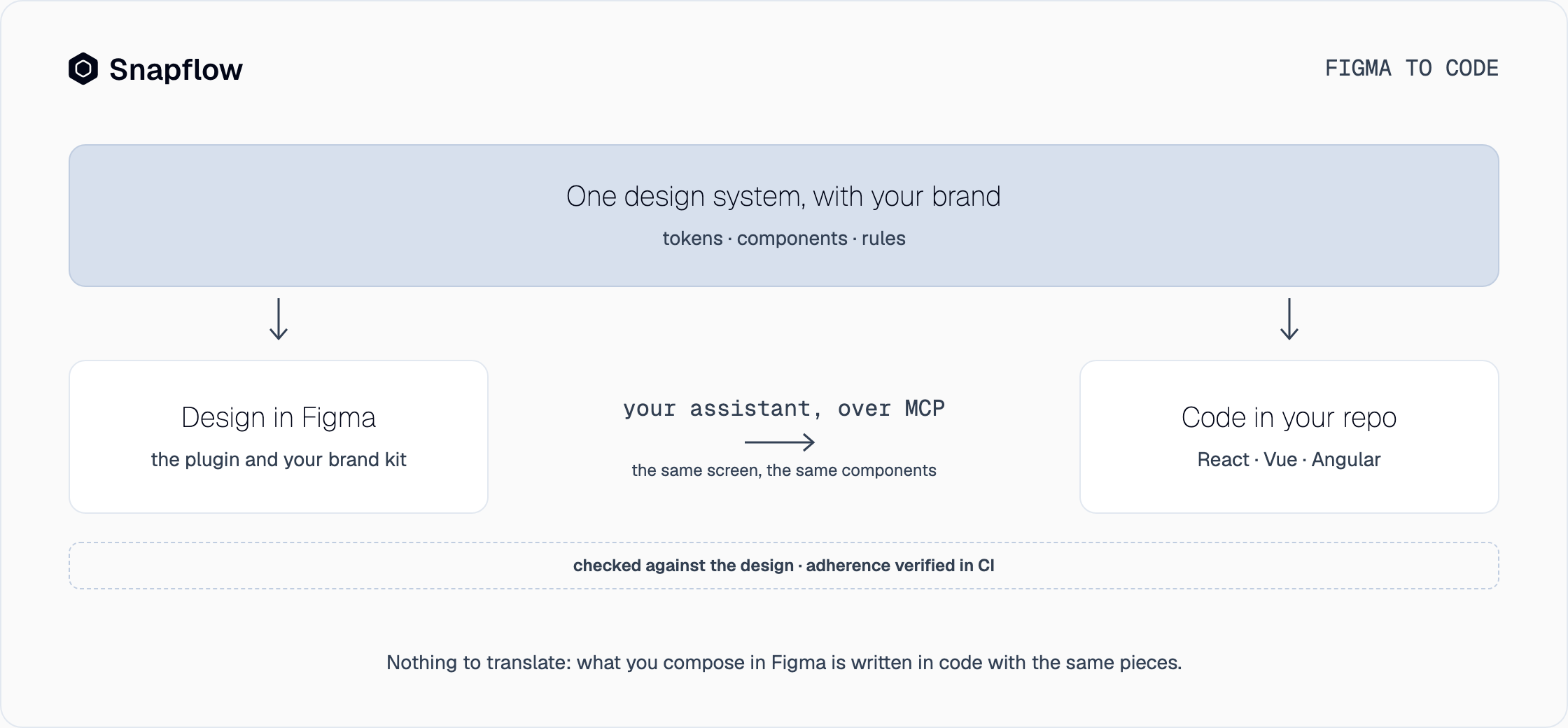
How a screen goes from Figma to code with Snapflow
Snapflow delivers an agentic design system already built, with tokens, components and governance rules, that lives on both sides at once. The journey of a screen looks like this:
- The kit with your brand is in Figma and in your repo. One command installs the Figma plugin and the connector for your assistant; the design system is customized with your brand in seven steps and the kit is published as a Figma library. The Figma components and the React, Vue or Angular components are the same, with the same names.
- You design the screen with those components. In Figma, with your brand kit, or in the web editor if your team does not use Figma. Every piece you place already exists in code.
- Your assistant turns the screen into code. It reads the design system over MCP, recognizes the components and variants on the screen and writes it in your repo's framework, following the project's lint and types. The code stays with your team; Snapflow does not store it.
- Verification closes the loop. The screen is checked against the Figma design, when there is one, and adherence to the system is reviewed in CI with no model involved: a loose value that does not come from the tokens does not get in.
The same design comes out in React, Vue 3 or Angular from the same definition. And if a token changes, it changes once: the plugin tells you the kit needs to be published again and the code picks it up on the next build. This is how the product works, step by step.
Figma to code with AI: what changes and what does not
For many teams the figma to code tool is already their coding assistant: Claude Code, Cursor or Codex. Pasting it a screenshot works for a demo. The problem shows up on the third screen, when the assistant reinvents the button again. AI does not change the rule: what it generates depends on what it reads.
| Your assistant with a screenshot | Your assistant with the design system | |
|---|---|---|
| What it reads | The image and what it remembers | Tokens, components and variants, over MCP |
| Consistency | Every screen invents a little | The same component on every screen |
| Framework | Whichever it feels like | Your repo's, with the components it already uses |
| Brand | The one it guesses | Yours, applied once to the system |
| Verification | Manual review | Checked against the design, adherence in CI |
That is why we talk about an agentic design system: not a system that has AI, but one your AI can read. Snapflow is not the agent. It is the design system the agent uses to write the screen the way you designed it.
How to evaluate a figma to code tool
If you are comparing options, these five questions separate the ones that translate from the ones that compose:
- Does it understand components or pixels? If exporting two identical buttons gives you two different buttons, it reads pixels.
- Does it output your repo's framework? React, Vue or Angular, with the components your team already uses, not a new library you have to adopt.
- What happens when a token changes? If the answer is "export again", the drift comes back with every change.
- Does it verify the result against the design? A screen nobody checks against its frame drifts without anyone noticing.
- Who owns the code? It has to stay in your repo, with no license over your files, even if you stop using the tool.
The tools on the map each cover one slice of the work; design system tools has the full landscape and figma to code tools compared takes Anima, Locofy, Builder.io and Dev Mode one by one. No slice replaces the system that feeds them.
Frequently asked questions
What is figma to code?
It is turning a screen designed in Figma into working front-end code, in React, Vue or Angular. It can be done by hand, with a plugin that exports the frame, or with an AI assistant. The difference that matters is whether the tool reads pixels or components.
What is the best figma to code plugin?
There is no single one. Almost all of them export one screen well and almost all of them fail on the fourth, because they translate the frame instead of recognizing its components. What decides the result is whether Figma and the code share the same design system; with that solved, even your coding assistant works as the plugin.
Can AI turn Figma into code?
Yes, and better every month, but it generates from what it reads. With a screenshot, it guesses components and reinvents them on every screen. With a design system it can read over MCP, it uses the components that already exist and the result is consistent.
Does figma to code work with React, Vue and Angular?
It depends on the tool. Snapflow compiles the same design system to React, Vue 3 and Angular from the same definition; each design system comes with one framework of your choice and the others are added as an add-on.
Are there free figma to code tools?
Yes: Figma's development mode comes with Figma and several plugins have a free tier. They are good for inspecting or starting a screen. What they do not solve is consistency across screens, and that is paid later, in reconciliation by hand. Snapflow has a fifteen-day free trial to try it with a screen of your own.
Try it with a screen of your own
The shortest way to understand figma to code without guessing is to design a screen with your brand kit and ask your assistant for it. Snapflow is in waitlist access and we release seats in batches, in order of arrival. Join the waitlist or see the pricing.