
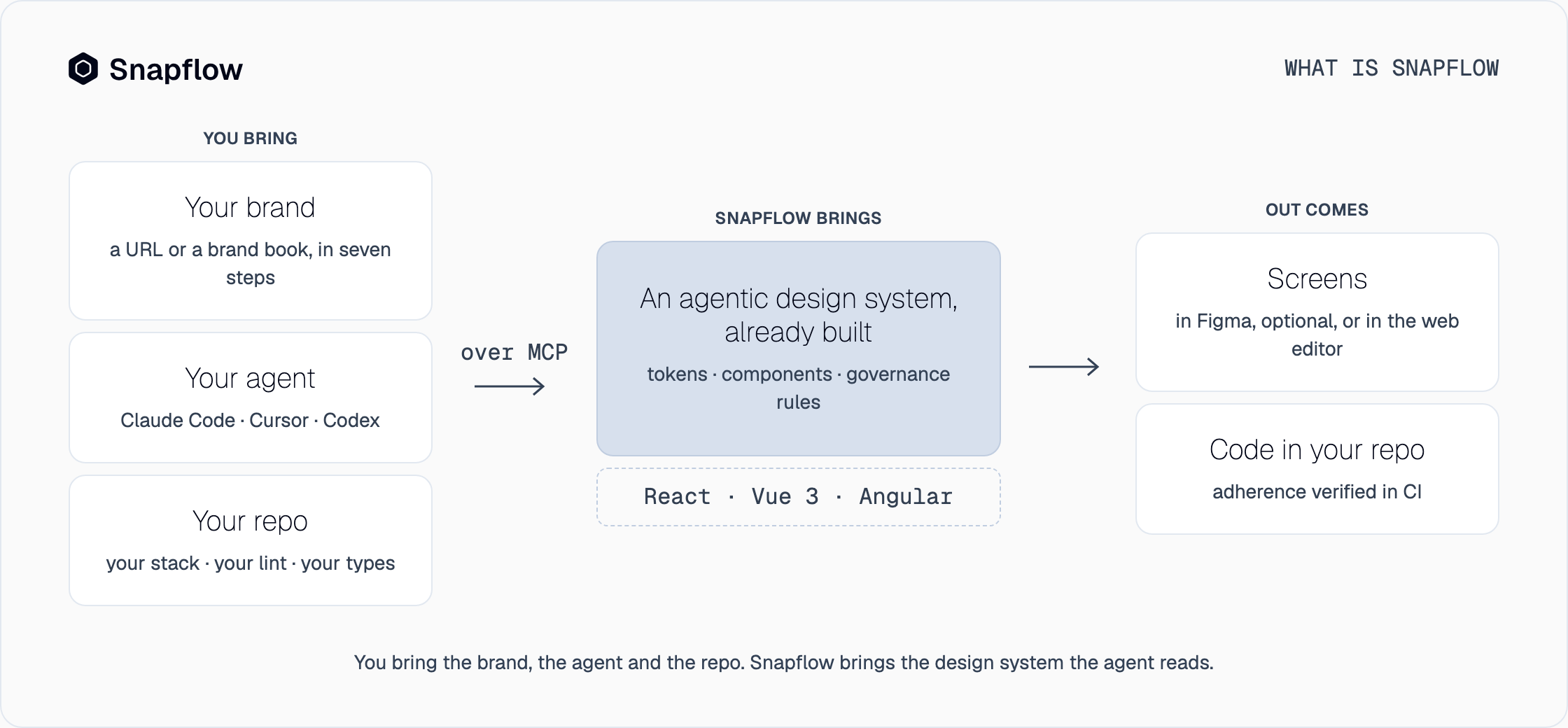
If you got here by searching for the name, this is the short answer. Snapflow is an agentic design system that ships already built and that your team personalizes with its brand. From there it is used from wherever each person works: the coding agent in the repo, the Figma plugin if you design there, or the web editor if you do not. This post covers what it delivers, how it is used, what you own and what the plan pays for, and how it differs from the tools it tends to get confused with. The underlying concept, what an agentic design system is and why your agent needs one, has its own post. Here we talk about the product.
What Snapflow delivers
You do not build the design system. Snapflow delivers it finished and you put your brand on it. Concretely, each design system comes with four things:
- Tokens, components and governance rules. The complete system, already designed and already built: every component with its variants and states, light and dark from the same tokens, responsive and keyboard-ready. The rules are not a separate document: they are what your agent has to follow and what you validate.
- Your brand, in seven steps. From a URL or a brand book come the colors, the typography, the radii and the logo. You do it once and everything that comes out afterwards carries it.
- Three frameworks from the same definition. React, Vue 3 and Angular. Each design system comes with one framework of your choice and the others are added as an add-on. The component is the same in all three.
- An accessibility contract in every export and updates while the plan is active.
What it does not deliver is the agent. Snapflow brings no model and no assistant of its own: it works with the one you already use, whether Claude Code, Cursor or Codex, with your AI subscription or with your own keys. It is not a design tool either. It does not replace Figma and, if you do not use Figma, it does not ask you to.
How it is used
The whole flow fits in five steps and stays inside your team: the code it generates lives in your repo and Snapflow does not keep it.
- One command installs it.
npx @snapflow-labs/onboardinstalls the connector for your assistant, the project skills and, if you use Figma, the plugin. It asks for your portal email and password and, at the end, invites you to open your assistant with/snapflow-hello, which walks you through the kit and your first screen. - You put your brand on it. The seven steps, from a URL or a brand book, with a live preview of the kit pieces as you choose.
- You design wherever you want, or not at all. If your team uses Figma, the plugin brings the kit with your brand and mirrors the same components as the code. If not, the web editor runs in the browser: you adjust pages, build new ones and change the brand without installing anything. What you publish there is what Figma and the assistant see.
- Your agent writes the code in your repo. With the
/snapflowskill and the MCP, you ask for screens from a description or a screenshot. The agent reads your stack, your rules (AGENTS.md, CLAUDE.md), your lint and your types; applies the system's tokens and components; and exports to your repo's framework. The result passes your own rules, not ours. - Adherence is verified in CI. With no model in between: a loose value that does not come from the tokens is a finding and the pull request does not pass. When there is a design in Figma, the screen is checked against it.
The full walkthrough, with what you see on screen at each step, is on the product page.
What you own and what the plan pays for
Every screen you choose stays in your Figma file and every export stays in your repo. No license on your files: if you leave, they stay with you. What the plan pays for is the deterministic engine in Snapflow Cloud that composes screens from the design system: same definition in, same Figma and same code out, every time.
| Item | Terms |
|---|---|
| Price | US$39 per person and per design system per month, or US$390 per year (two months free) |
| Framework included | One of your choice: React, Vue 3 or Angular |
| Additional framework | US$9 per seat per month, or US$90 per year |
| Trial | Fifteen days free on every plan, no card |
| Billing | Per-seat subscription, through Stripe; cancel whenever you want |
| Access | By waitlist, with seats released in batches and in order |
Each person pays for the design systems they have access to. If you need your own cloud or have several teams and products, Snapflow is implemented as a service, with discovery, implementation and hands-on support: that is the Multi-product Enterprise plan. The details and the calculator are on the pricing page.
How it is different
Snapflow tends to be compared with two things it is not: a plugin that turns a Figma file into code, and a platform that documents the design system. The three answer different problems.
| Figma-to-code plugin | Documentation platform | Snapflow | |
|---|---|---|---|
| What it reads | The pixels or layers of a file | What someone writes about the system | Tokens, components and rules, through MCP |
| What it produces | Code that resembles the design and then has to be reconciled | Pages that describe the system | Screens and code built with the system's components |
| When a token changes | You export again by hand | The page is updated and people are notified | The agent generates with the new value from the next prompt |
| Who governs it | Nobody: the result depends on the file | A person, in review | CI, on every pull request |
The Figma-to-code flow with a design system in the middle is in Figma to code, and the plugins that attempt it without one are in the tools comparison. The difference with documentation platforms is covered in zeroheight alternatives.
Frequently asked questions
Is Snapflow an AI agent?
No. Snapflow is the design system your agent calls through MCP. You keep using Claude Code, Cursor or Codex, with your subscription or your keys; what changes is that they now read a deterministic system instead of guessing.
Do I need Figma?
No. The Figma plugin mirrors the same components for teams that design there, but it is optional. Without Figma, you adjust and build pages in the web editor and your agent writes the code in the repo.
Do I need a design system to start?
No. Snapflow delivers one already built, with tokens, components and governance rules, and you personalize it with your brand in seven steps. Your design decisions come in as brand; there is no library to migrate.
Which frameworks does it work with?
React, Vue 3 and Angular, from the same definition. Each design system comes with one framework of your choice, and each additional framework is an add-on at US$9 per seat per month.
How much does it cost and how do I get access?
US$39 per person and per design system per month, or US$390 per year, with one framework included. Fifteen days free on every plan, no card. Access is by waitlist: leave your email and we let you know when your seat opens.
Request your access
Snapflow is waitlist-only for now, and we release seats in batches, in order. All it takes is your email. Join the waitlist or see the pricing.