A design system runs on repetitive work. Someone changes a color and someone else copies it into the code. A new component shows up in the design and someone rebuilds it by hand. A rule exists and a reviewer enforces it on every pull request, or misses it. Each of those steps depends on a person remembering, and each one is a place where the system drifts. This post covers what is worth automating, what is not, and how to tell whether your team has reached the point where it pays off.
What it means to automate a design system
Automating a design system means the system itself guarantees that a design decision reaches production unchanged, without one person copying it and another one policing it. It does not replace designers or developers: it takes the translation and the mechanical review off their plate so they spend that time deciding.
That is why it is an infrastructure problem and not a tooling one. A plugin automates one stretch, like exporting a frame or checking contrast. The automation that matters covers the whole chain: from a token's value to the component in the repo, with a check that runs on its own every time someone proposes a change. If you want the starting point of that chain, tokens, it is explained in what design tokens are.
The four layers worth automating
Not everything deserves automation. The layers that pay back the most are the deterministic, repetitive ones, where a person adds no judgment but can still make mistakes:
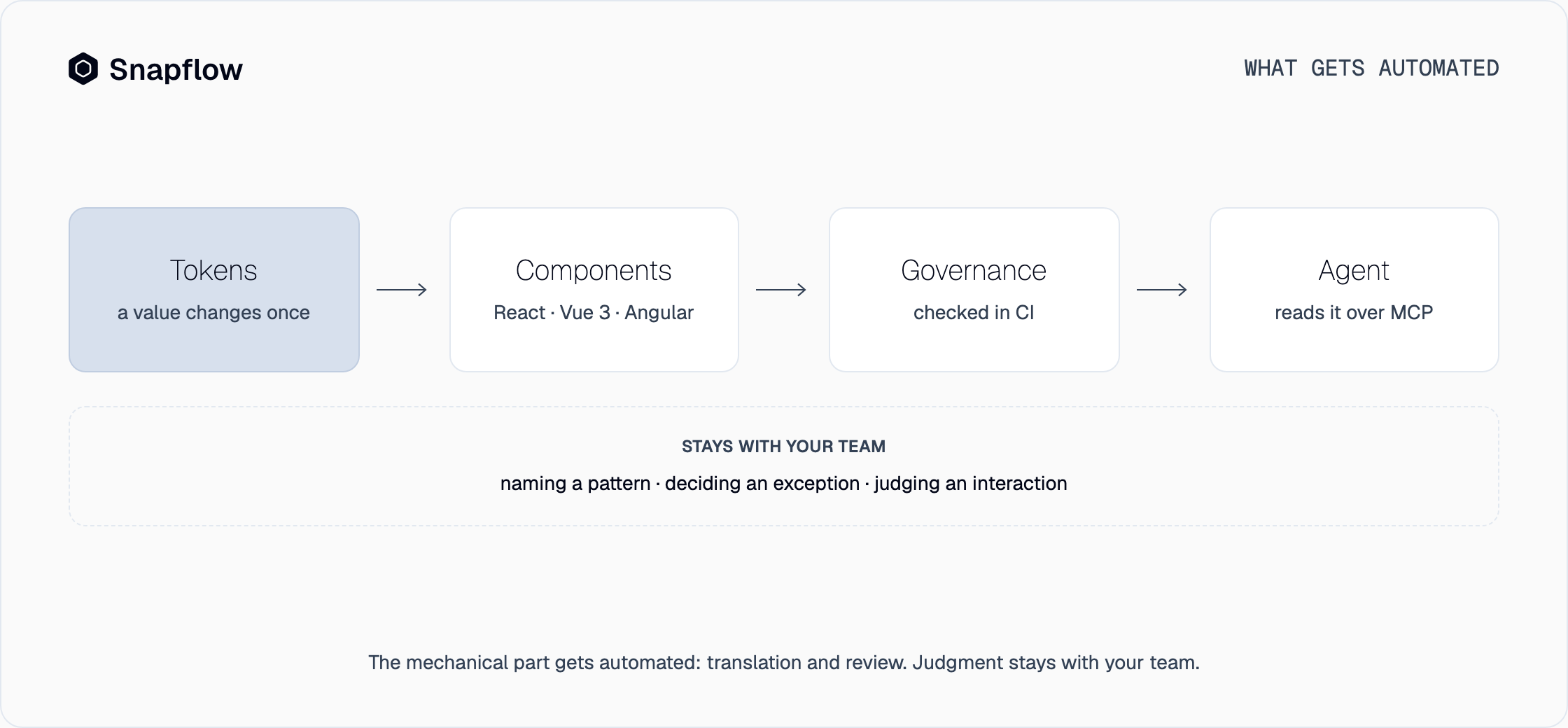
- Tokens. Color, type, spacing and radii are defined once and reach the code with no spreadsheets and no copying by hand. This is the first layer because every other layer depends on it: when a token changes, the change has to land everywhere in the same step.
- Components. Each component is defined once, with its variants and states, and the implementations come out of that definition. The same button is the same button in React, Vue 3 and Angular, and a fix happens once.
- Governance. Rules stop being a document and become a check that runs in CI. A value that does not come from the tokens, or a component used outside its contract, is a finding, and the pull request does not pass. It is deterministic: no model in the loop.
- Agent context. If your team writes code with an agent, the agent needs to read the system, not guess it. Exposed over MCP, the design system hands it the tokens, the components and the rules, and what it generates uses the right pieces from the first pass. We go deeper in what an agentic design system is.
What not to automate
What does not get automated is judgment. Naming a new pattern, deciding when a rule has an exception, judging whether an interaction feels right, or handling a case the system does not cover: that is still work for people. Good automation does not hide it, it protects it, because it frees the time that today goes into copying values and reviewing by eye.
It also does not pay to automate before you have something to automate. If the team has not agreed on its tokens and base components, automation only speeds up the mess. That is why it makes sense to start from a system that is already built, or to build one first; the guide on how to build a design system walks through that path.
Manual upkeep and an automated system
The difference shows over time. Manual upkeep degrades as products and the team grow; an automated system holds.
| Manual upkeep | Automated system | |
|---|---|---|
| A token changes | Copied by hand in every place | Changes once and reaches everything |
| A new component | Each team rebuilds it its own way | Comes from one definition, the same in every framework |
| Consistency | Depends on effort and review | CI checks it on every pull request |
| Code with an agent | The agent guesses patterns from existing code | The agent reads the system over MCP |
| As you grow | Every product and every hire adds upkeep | The system absorbs the load |
The manual column is not a talent problem. It is what happens when a component library has to behave like infrastructure: it stores the pieces, but nobody guarantees they are used well.
How to tell if you need it
You do not need a calculation to know. If you recognize several of these signs, your team is already paying the cost of manual work:
- A brand or color change takes weeks to reach every product.
- The same component exists in two or three versions, depending on who built it.
- Pull request reviews include comments like "that color is not ours".
- You have more than one framework, or more than one product, that should look the same.
- Your team uses a coding agent and what it generates needs fixing to match the system.
If none of these sound familiar, you probably do not need it yet, and that is fine: automation pays when the repetitive work already exists.
How Snapflow handles it
Snapflow starts from the other end: instead of asking you to automate a system you first have to build, it delivers an agentic design system that is already built, with the four layers in place, and you customize it with your brand in seven steps.
- Tokens and components, already built. The full system, with variants, states, light and dark from the same tokens. Your brand goes in once and everything that comes out wears it.
- Three frameworks from the same definition. React, Vue 3 and Angular. Each design system comes with one of your choice and the others are add-ons. Details are on the product page.
- Governance in CI. Adherence is checked on every pull request, with no model in the loop. See how it works under governance.
- The system, over MCP. Your agent, whether Claude Code, Cursor or Codex, reads the tokens, the components and the rules, and writes the code in your repo with your lint rules and your types.
What you generate stays in your repo, and in your Figma file if you use Figma. If you leave, it stays with you. The full walkthrough is in what Snapflow is.
Frequently asked questions
What is design system automation?
It is replacing the manual work that keeps a design system in order, like copying tokens, rebuilding components and checking that rules are followed, with a system that does it deterministically. The goal is for consistency to be a property of the system, not the result of someone's effort.
What should be automated first?
Tokens, because everything else depends on them. Then components, then governance in CI and, if your team uses a coding agent, the context that agent reads. Judgment calls, like naming patterns or approving exceptions, stay human.
Is it the same as a Figma plugin?
No. A plugin automates one stretch, like exporting a frame or checking a file. Automating the design system covers the whole chain, from the token to the code in the repo, with a check that runs on its own on every change.
Does automation replace designers or engineers?
No. It automates the translation and the mechanical review, not the work of deciding. Design and engineering spend less time reconciling and more time on product.
Request your access
Snapflow is waitlist-only for now, and we release seats in batches, in order. All it takes is your email. Join the waitlist or see the pricing.