Figma to Code Tools Compared: Anima, Locofy, Builder.io, Dev Mode
An honest comparison of figma to code tools in 2026, what each one is best at, and the one axis that decides whether the output actually ships.
Key Takeaway
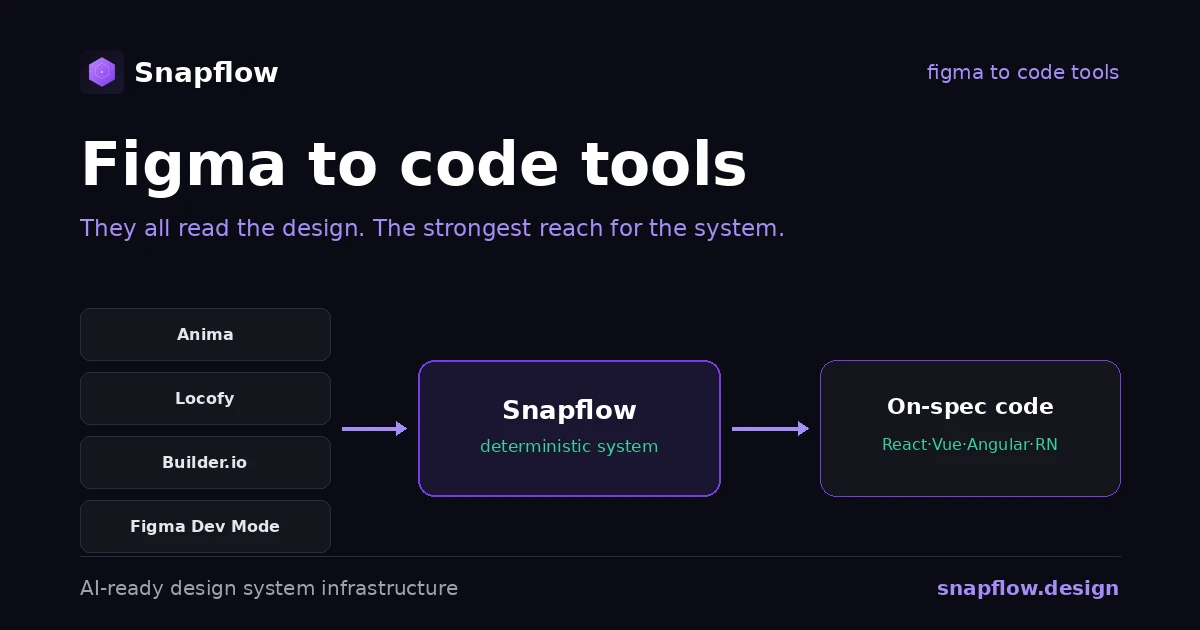
The best figma to code tools in 2026 are Anima, Locofy, Builder.io Visual Copilot, and Figma Dev Mode, and each is genuinely good at what it does. But they answer the same question in different ways: how do I turn a design into code? The axis that actually decides output quality is not which tool, it is what the tool reads. Read the picture and it guesses; read a deterministic system and it stops. The strongest tools are already climbing toward reading the system. That climb has a name: infrastructure.
If you are comparing figma to code tools, you are choosing between four serious options, and the honest answer is that all of them work. The differences that matter are what frameworks they target, whether they reuse your existing components, and how consistent the output is run to run. This is the honest map, tool by tool, plus the one distinction that changes how you read the whole category.
The tools, honestly
Anima
The most-installed design-to-code plugin on Figma, and a launch partner for Dev Mode. Anima turns a frame into clean React, Vue, HTML, and Tailwind, with TypeScript and prop types, and its Frontier extension maps output to components you already have. If you want fast, readable React from a design with minimal setup, Anima is a strong default. Its ceiling is the same as any frame-reader: the quality depends on how well the design maps to a system it cannot see.
Locofy
Locofy produces arguably the cleanest component structure of the group, named components that track your Figma layers, consistent flexbox, and the widest framework reach: React, Vue, Angular, Next.js, React Native, and Flutter. Its Lightning mode is one-click; Classic lets you tag elements by hand for more control. Locofy is the pick when you ship to many frameworks or want output a junior developer can read. The tagging step is where you are, in effect, adding the system context the tool needs.
Builder.io Visual Copilot
Visual Copilot uses an AI model trained on millions of examples to convert designs into React, Vue, Svelte, Angular, Qwik, Solid, or HTML in one click, and it maps reusable Figma components to the ones in your repository. In 2026 it pairs with AI IDEs like Cursor and Windsurf to move a design through your agent and into your codebase. This is the tool leaning hardest into your existing components, which is exactly the right instinct. Its output is only as consistent as the component mapping it can resolve.
Figma Dev Mode
Dev Mode is native inspection and handoff inside Figma, and its 2026 MCP server is the important move: it exposes your file's structure, layout, tokens, text styles, component properties, to an AI coding agent over the Model Context Protocol. Instead of your agent guessing from a screenshot, it requests live design data and writes against it. Dev Mode does not generate a finished app; it feeds structured context to whatever generates. That is a quiet admission of the whole thesis: the output gets better when the agent reads the system instead of the picture.
Figma to code tools compared
| Tool | What it reads | Frameworks | Reuses your components | Best for |
|---|---|---|---|---|
| Anima | The design frame | React, Vue, HTML, Tailwind | Maps via Frontier | Fast, clean React from a design |
| Locofy | The design, tagged | React, Vue, Angular, RN, Flutter | Component libraries | Cleanest structure, many frameworks |
| Builder.io Visual Copilot | The design, plus AI | React, Vue, Svelte, Angular, Qwik, Solid | Maps to your repo | AI-IDE pipeline, component reuse |
| Figma Dev Mode | The file, via MCP | Depends on your agent | Exposes tokens and props | Feeding agents structured context |
| Snapflow (infrastructure) | Your deterministic system | React, Vue, Angular, React Native | The system is your components | Consistent generation from one source |
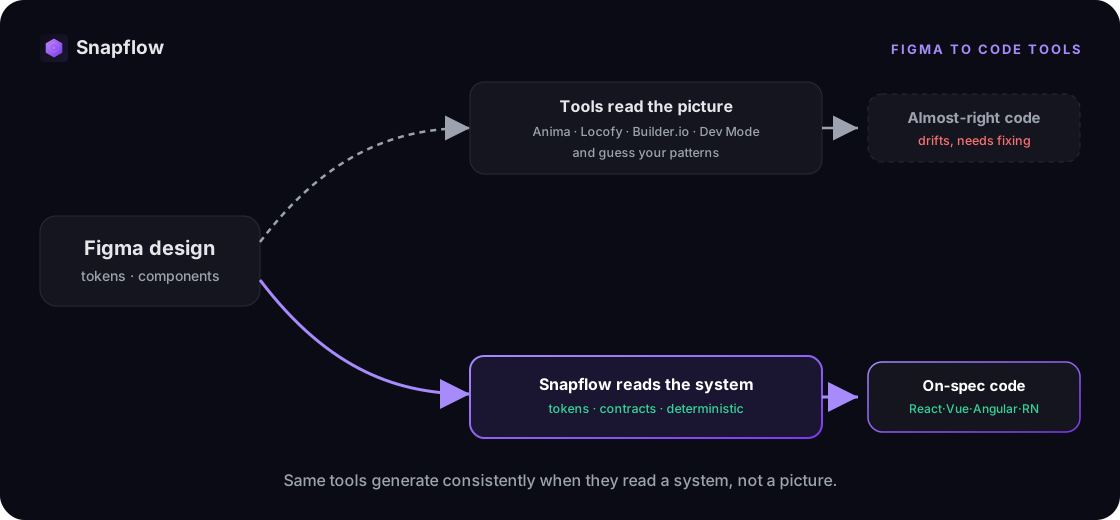
Read the table by column and the pattern appears. Every tool is working to read more of your system and less of your picture. Anima maps to existing components, Builder.io maps to your repo, Dev Mode exposes tokens to agents. They are all reaching for the same thing: a deterministic source of truth to generate from.
The axis that actually decides
There is only one distinction that changes the output at the root: does the tool read the picture, or does it read the system?
A tool that reads the picture produces code that looks like your design and then drifts from your real component library, because it inferred your patterns instead of receiving them. A tool that reads a deterministic system, tokens, component contracts, governance, generates code that is on-spec by construction, because the system is the input, not a guess about it. This is why the checklist for picking a tool is short, and we wrote it out in the figma to code guide: reads a source of truth or infers from the frame, same result every run or drift, covers the frameworks you ship, and code you own.
Where Snapflow fits: the layer the tools read
Snapflow is not the sixth tool in this table. It is the deterministic layer the other five are reaching for: a token pipeline, component contracts, governance, and an AI context layer, native to React, Vue, Angular, and React Native, and owned by your team. Point any of these tools, or your own AI agents, at a real system and they stop guessing. From a prompt, Snapflow produces high-fidelity design in Figma and production code at the same time, a flow that normally takes days generated in 10 to 15 minutes in our demos. See how the design-to-code pipeline works, and how we measure each number. Keep the tool you like. Give it a system to read.
FAQ
What is the best figma to code tool?
It depends on your target. Anima for fast, clean React from a frame; Locofy for the cleanest structure across the most frameworks; Builder.io Visual Copilot for AI-IDE pipelines and repo component reuse; Figma Dev Mode for feeding structured context to your own agent. The larger point is that the best tool still guesses unless it reads a deterministic system.
Is there a free figma to code tool?
Yes. Anima has a free tier with limited daily generations, Locofy offers free tokens, and Figma Dev Mode is included with Figma. Free tiers are great for evaluation. Just remember that "free" output usually guesses your patterns from the visual, so consistency still comes from the system underneath, not the plugin.
Which figma to code tool supports React, Vue, and Angular?
Locofy and Builder.io Visual Copilot both cover React, Vue, and Angular, and Locofy adds React Native and Flutter. Snapflow generates React, Vue, Angular, and React Native from one source of truth, so the same system serves every target.
Can AI convert Figma to code reliably?
AI converts Figma to code well, and only as reliably as the context it reads. Given a screenshot it infers your system and reproduces inconsistencies; given a deterministic system, tokens and contracts, it generates consistent, on-spec output. The 2026 direction, Builder.io's repo mapping and Figma's Dev Mode MCP, is the industry moving toward reading the system.
See it on your own stack
The fastest way to see the difference is on your own design system. Book a free 30-minute diagnosis: we map your current design-to-code flow, whichever tools you use, and show you exactly where the guessing happens, with your team's real numbers. No pitch, just clarity. Start with a diagnosis, or run the numbers first.
Ready to build your design system infrastructure?
30-minute free diagnosis. No pitch, just clarity on your design system state and AI-readiness.
Related Articles
Design Tokens: What They Are, the Standard, and How They Reach Code
Design tokens explained: what they are, the three tiers, naming by intent, the new W3C standard, and the pipeline that turns a token file into production code.
Figma to Code: Tools, AI, and What Actually Ships
Figma to code tools turn designs into code, but most guess. The categories, why AI generators drift, and the deterministic alternative for enterprise.
Supernova vs zeroheight: Which Design System Platform (2026)
Supernova vs zeroheight, compared honestly: documentation, token automation, setup, and code. What each wins, and the job neither is built to do.